RAG vs. Fine-Tuning: A Complete Guide to Choosing the Right Strategy for Custom AI Applications
When adapting Large Language Models to your business data, should you fine-tune the model or use Retrieval-Augmented Generation? We compare both approaches with decision frameworks and implementation guidance.
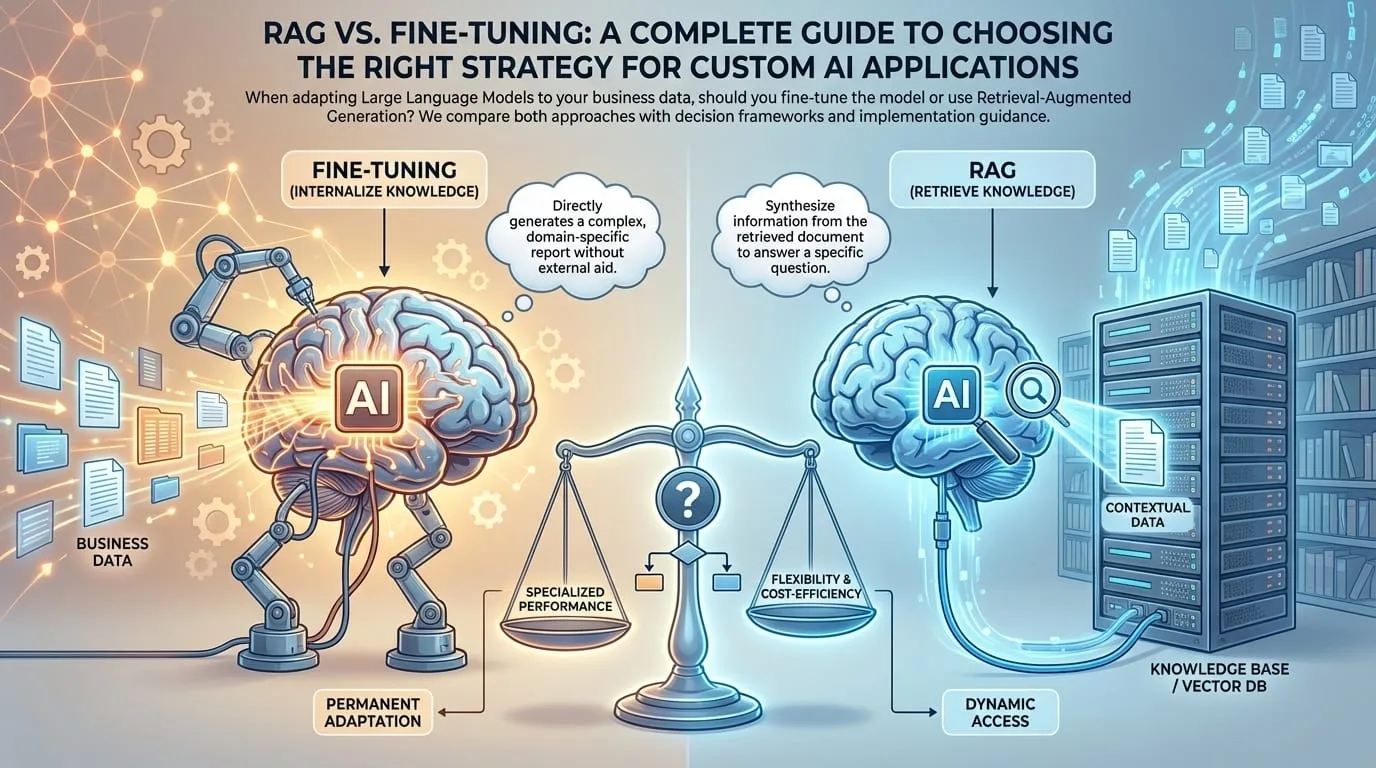
A common misconception in enterprise AI is that to make an LLM "know" your data, you must retrain it. While training (or fine-tuning) is powerful, it is often expensive, slow, and overkill for many use cases. Enter Retrieval-Augmented Generation (RAG)-a technique that's become the go-to solution for 90% of enterprise AI applications.
In this comprehensive guide, we'll explore both approaches, provide a clear decision framework, and share implementation best practices for each.
Understanding the Landscape
Before diving into the comparison, let's understand what we're solving for:
| Challenge | What You're Trying to Do |
|---|---|
| Domain Knowledge | Make the AI understand your specific business context |
| Proprietary Data | Access company documents, policies, products |
| Accuracy | Reduce hallucinations with factual grounding |
| Currency | Keep information up-to-date |
| Compliance | Control what data the AI can access |
Both RAG and fine-tuning address these challenges-but in fundamentally different ways.
What is Fine-Tuning?
Fine-tuning involves taking a pre-trained model (like GPT-4, Claude, or Llama 3) and training it further on your specific dataset. The model's weights are updated to incorporate new knowledge or behaviors.
Fine-Tuning Process

┌─────────────────────────────────────────────────────────────┐
│                    Pre-trained Model                         │
│               (General Knowledge Base)                       │
│                                                              │
│    "I know about: history, science, coding, languages..."   │
└──────────────────────────┬──────────────────────────────────┘
                           │
                           ▼
┌─────────────────────────────────────────────────────────────┐
│                   Your Training Data                         │
│                                                              │
│    - Company documents                                       │
│    - Customer interactions                                   │
│    - Domain-specific examples                                │
│    - Input/Output pairs                                      │
└──────────────────────────┬──────────────────────────────────┘
                           │
                           ▼  [GPU Training: Hours to Days]
                           │
┌─────────────────────────────────────────────────────────────┐
│                   Fine-Tuned Model                           │
│                                                              │
│    "I know general knowledge + your specific domain"        │
│    (Knowledge frozen at training time)                       │
└─────────────────────────────────────────────────────────────┘
How Fine-Tuning Works
# Simplified fine-tuning example
from openai import OpenAI

client = OpenAI()

# 1. Prepare training data (JSONL format)
training_data = [
    {
        "messages": [
            {"role": "system", "content": "You are a helpful medical coding assistant."},
            {"role": "user", "content": "What's the ICD-10 code for Type 2 diabetes?"},
            {"role": "assistant", "content": "E11 - Type 2 diabetes mellitus"}
        ]
    },
    # ... thousands more examples
]

# 2. Upload and train
file = client.files.create(file=open("training.jsonl", "rb"), purpose="fine-tune")
job = client.fine_tuning.jobs.create(training_file=file.id, model="gpt-4o-mini")

# 3. Use fine-tuned model
response = client.chat.completions.create(
    model="ft:gpt-4o-mini:my-org::abc123",  # Your fine-tuned model
    messages=[{"role": "user", "content": "Code for hypertension?"}]
)
Fine-Tuning Advantages
| Advantage | Description |
|---|---|
| Style & Tone | Model learns your brand voice, writing style |
| Format Control | Consistent output formats (JSON, XML, specific templates) |
| Behavioral Patterns | Custom response patterns, reasoning chains |
| Latency | No retrieval step needed at inference time |
| Specialized Vocabulary | Domain jargon becomes natural |
Fine-Tuning Limitations
| Limitation | Impact |
|---|---|
| Cost | GPU training can cost $1K-$100K+ depending on model size |
| Time | Hours to days for training; weeks for iteration |
| Frozen Knowledge | Information is fixed at training time |
| Catastrophic Forgetting | May lose general capabilities |
| Data Requirements | Need thousands of high-quality examples |
| No Citations | Can't point to sources |
| Version Control | Each update requires full retraining |
What is RAG?
Retrieval-Augmented Generation (RAG) keeps the model generic but gives it access to a "library" of your documents. When a user asks a question, the system searches the library, finds relevant documents, and includes them in the prompt as context.
RAG Architecture

┌─────────────────────────────────────────────────────────────┐
│                     Your Documents                           │
│                                                              │
│  📄 HR Handbook    📄 Product Docs    📄 Knowledge Base     │
│  📄 Policies       📄 FAQs            📄 Training Materials │
└──────────────────────────┬──────────────────────────────────┘
                           │
                           ▼  [Embedding & Indexing]
                           │
┌─────────────────────────────────────────────────────────────┐
│                   Vector Database                            │
│                                                              │
│   "HR Handbook, Ch.3" → [0.23, -0.45, 0.67, ...]            │
│   "Product FAQ #42"   → [0.12, 0.89, -0.34, ...]            │
│   "Policy: Remote"    → [-0.56, 0.21, 0.78, ...]            │
└──────────────────────────┬──────────────────────────────────┘
                           │
User Query: "What's our    │
remote work policy?"       │
         │                 │
         ▼                 ▼
┌─────────────────────────────────────────────────────────────┐
│                   Retrieval Step                             │
│                                                              │
│   Query → Embed → Search → Top K Results                    │
│   "remote work policy" → [Similar: Policy: Remote, ...]     │
└──────────────────────────┬──────────────────────────────────┘
                           │
                           ▼
┌─────────────────────────────────────────────────────────────┐
│                   Generation Step                            │
│                                                              │
│   Prompt:                                                    │
│   "Based on these documents: [retrieved docs]                │
│    Answer: What's our remote work policy?"                   │
│                                                              │
│   → LLM generates grounded response with citations           │
└─────────────────────────────────────────────────────────────┘
How RAG Works
from langchain.embeddings import OpenAIEmbeddings
from langchain.vectorstores import Pinecone
from langchain.chat_models import ChatOpenAI
from langchain.chains import RetrievalQA

# 1. Embed and store documents
embeddings = OpenAIEmbeddings()
vectorstore = Pinecone.from_documents(
    documents=your_documents,
    embedding=embeddings,
    index_name="company-knowledge"
)

# 2. Create retriever
retriever = vectorstore.as_retriever(
    search_type="similarity",
    search_kwargs={"k": 5}  # Top 5 relevant docs
)

# 3. Create RAG chain
qa_chain = RetrievalQA.from_chain_type(
    llm=ChatOpenAI(model="gpt-4"),
    chain_type="stuff",
    retriever=retriever,
    return_source_documents=True  # Enable citations
)

# 4. Query with retrieval
result = qa_chain({"query": "What's our remote work policy?"})
print(result["result"])
print("Sources:", result["source_documents"])
RAG Advantages
| Advantage | Description |
|---|---|
| Real-time Updates | Add a document, AI knows it instantly |
| Citations | Point to exact sources ("See HR Handbook, page 4") |
| Access Control | Filter retrieval based on user permissions |
| Cost Effective | No GPU training required |
| Scalable | Add millions of documents |
| Auditable | See exactly what context was used |
| Easy Updates | No retraining needed |
RAG Limitations
| Limitation | Impact |
|---|---|
| Context Window | Limited by model's token limit |
| Retrieval Quality | Garbage in, garbage out |
| Latency | Extra retrieval step adds ~200-500ms |
| Chunking Complexity | Document splitting affects quality |
| No Style Learning | Can't change how the model writes |
Head-to-Head Comparison
| Factor | RAG | Fine-Tuning |
|---|---|---|
| Setup Cost | Low ($100s) | High ($1K-$100K+) |
| Time to Deploy | Hours | Days to weeks |
| Knowledge Updates | Instant | Requires retraining |
| Accuracy | High (with good retrieval) | Variable |
| Hallucination Risk | Low (grounded in docs) | Medium to high |
| Citations | Yes | No |
| Custom Style | Limited | Excellent |
| Format Control | Moderate | Excellent |
| Latency | +200-500ms | Baseline |
| Access Control | Easy | Difficult |
| Maintenance | Update documents | Retrain model |
Decision Framework
Use this flowchart to choose the right approach:
┌─────────────────────────────────────────────┐
│ Do you need the model to learn a specific   │
│ style, format, or behavior pattern?         │
└───────────────────┬─────────────────────────┘
                    │
        Yes ────────┼────────── No
        │           │            │
        ▼           │            ▼
┌───────────────┐   │   ┌─────────────────────────────┐
│  Consider     │   │   │ Do you need up-to-date      │
│  FINE-TUNING  │   │   │ information or citations?   │
└───────────────┘   │   └───────────────┬─────────────┘
                    │                   │
                    │       Yes ────────┼────────── No
                    │       │           │            │
                    │       ▼           │            ▼
                    │  ┌─────────┐      │    ┌─────────────────┐
                    │  │   RAG   │      │    │ Is your budget  │
                    │  └─────────┘      │    │ limited?        │
                    │                   │    └────────┬────────┘
                    │                   │             │
                    │                   │   Yes ──────┼────── No
                    │                   │   │         │        │
                    │                   │   ▼         │        ▼
                    │                   │ ┌─────┐     │  ┌───────────┐
                    │                   │ │ RAG │     │  │ Either or │
                    │                   │ └─────┘     │  │ Hybrid    │
                    └───────────────────┴─────────────┴──┴───────────┘
When to Choose RAG
RAG is the right choice for 90% of enterprise use cases:
- Knowledge Bases: Internal documentation, HR policies, product info
- Customer Support: FAQ answering with source links
- Legal/Compliance: Document search with citations
- Research Assistants: Search across papers, reports, data
- Help Desks: IT support with knowledge base access
- Content Discovery: Finding relevant documents
When to Choose Fine-Tuning
Fine-tuning shines in specialized scenarios:
- Custom Language: Proprietary code syntax, medical terminology
- Specific Formats: Complex JSON schemas, structured reports
- Behavioral Patterns: Specific reasoning chains, multi-step workflows
- Brand Voice: Consistent tone across all outputs
- Performance Critical: Where retrieval latency is unacceptable
When to Use Both (Hybrid)
The most powerful approach combines both:
Hybrid RAG + Fine-Tuning

┌─────────────────────────────────────────────────────────────┐
│                                                              │
│  Fine-Tuned Model              Vector Database              │
│  ─────────────────             ─────────────────            │
│  • Medical terminology         • Latest research papers     │
│  • Report format               • Drug interactions DB       │
│  • Clinical reasoning          • Treatment guidelines       │
│                                                              │
│           │                           │                      │
│           └───────────┬───────────────┘                      │
│                       │                                      │
│                       ▼                                      │
│           ┌───────────────────────┐                          │
│           │  User Query           │                          │
│           │  "Treatment options   │                          │
│           │   for patient with    │                          │
│           │   condition X?"       │                          │
│           └───────────┬───────────┘                          │
│                       │                                      │
│                       ▼                                      │
│           ┌───────────────────────┐                          │
│           │ Response: Structured  │                          │
│           │ clinical report with  │                          │
│           │ citations to latest   │                          │
│           │ research              │                          │
│           └───────────────────────┘                          │
│                                                              │
└─────────────────────────────────────────────────────────────┘
RAG Implementation Best Practices
1. Chunking Strategy
How you split documents dramatically affects retrieval quality:
# Poor: Arbitrary character splits
chunks = text.split(1000)  # Breaks mid-sentence

# Better: Semantic chunking
from langchain.text_splitter import RecursiveCharacterTextSplitter

splitter = RecursiveCharacterTextSplitter(
    chunk_size=500,
    chunk_overlap=50,
    separators=["\n\n", "\n", ". ", " "]  # Respects structure
)
chunks = splitter.split_documents(documents)

# Best: Document-aware chunking
# Split by sections, paragraphs, or logical units
2. Embedding Selection
| Embedding Model | Dimensions | Best For |
|---|---|---|
| text-embedding-3-small | 1536 | General purpose, cost-effective |
| text-embedding-3-large | 3072 | Higher accuracy, more nuance |
| Cohere embed-v3 | 1024 | Multilingual |
| BGE-large | 1024 | Open source, self-hosted |
3. Retrieval Enhancement
# Hybrid search: Combine semantic + keyword
from langchain.retrievers import EnsembleRetriever

semantic_retriever = vectorstore.as_retriever(search_kwargs={"k": 3})
keyword_retriever = BM25Retriever.from_documents(docs)

ensemble = EnsembleRetriever(
    retrievers=[semantic_retriever, keyword_retriever],
    weights=[0.7, 0.3]  # Favor semantic
)

# Reranking: Improve result quality
from langchain.retrievers import ContextualCompressionRetriever
from langchain.retrievers.document_compressors import CohereRerank

reranker = CohereRerank(top_n=5)
compression_retriever = ContextualCompressionRetriever(
    base_compressor=reranker,
    base_retriever=ensemble
)
4. Context Optimization
# Include metadata for better context
prompt_template = """
Based on the following documents, answer the question.
Cite your sources using [Source: document_name].

Documents:
{context}

Question: {question}

Answer:
"""

# Structure context with metadata
def format_docs(docs):
    formatted = []
    for doc in docs:
        formatted.append(
            f"[Source: {doc.metadata['source']}, Page: {doc.metadata.get('page', 'N/A')}]\n"
            f"{doc.page_content}\n"
        )
    return "\n---\n".join(formatted)
Fine-Tuning Best Practices
1. Data Quality Over Quantity
# High-quality training example
{
    "messages": [
        {"role": "system", "content": "You are an expert financial analyst. Provide analysis in the following JSON format: {analysis, confidence, key_factors}"},
        {"role": "user", "content": "Analyze ACME Corp Q3 earnings: Revenue $1.2B (+15% YoY), Net Income $120M, EPS $1.45"},
        {"role": "assistant", "content": "{\"analysis\": \"Strong quarter with double-digit revenue growth exceeding market expectations...\", \"confidence\": \"high\", \"key_factors\": [\"Revenue growth acceleration\", \"Margin expansion\", \"Beat EPS estimates\"]}"}
    ]
}
2. Evaluate Before and After
# Create evaluation dataset (separate from training)
eval_cases = [
    {"input": "...", "expected_output": "..."},
    # ...
]

# Compare base vs fine-tuned
for case in eval_cases:
    base_response = base_model.generate(case["input"])
    ft_response = fine_tuned_model.generate(case["input"])

    scores = {
        "base_accuracy": evaluate(base_response, case["expected"]),
        "ft_accuracy": evaluate(ft_response, case["expected"])
    }
3. Avoid Overfitting
- Use 10-20% of data for validation
- Monitor loss curves
- Test on held-out examples
- Check for catastrophic forgetting
Cost Comparison
| Scenario | RAG Cost | Fine-Tuning Cost |
|---|---|---|
| Setup | ~$50-500 (embeddings + vector DB) | ~$1,000-50,000 (training compute) |
| Monthly (10K queries) | ~$100-300 (embeddings + retrieval + LLM) | ~$50-200 (LLM only) |
| Knowledge Update | ~$1-10 (re-embed docs) | ~$500-5,000 (retrain) |
| Scaling to 1M docs | ~$500-2,000/month | N/A (knowledge in weights) |
Key Takeaways
- RAG is the default choice for most enterprise applications
- Fine-tuning excels at style, format, and specialized behaviors
- Hybrid approaches combine the best of both worlds
- Start with RAG - it's faster, cheaper, and easier to update
- Consider fine-tuning when RAG hits limitations
- Quality matters - garbage in, garbage out for both approaches
- Citations build trust - RAG's ability to cite sources is invaluable
For 90% of enterprise use cases (Knowledge Bases, Customer Support, Internal Search), RAG is the superior choice. It offers better accuracy, lower cost, and real-time updates.
When to Fine-Tune: Use fine-tuning when you need the model to learn a new language (e.g., a proprietary coding language) or a very specific output format (e.g., generating complex medical JSON reports) that standard prompting fails to achieve.
Building an AI application and unsure which approach to use? Contact EGI Consulting for a custom AI strategy assessment and implementation roadmap tailored to your specific use case and data requirements.
Keep reading
All articles
The Future of AI in Enterprise Software: Trends, Strategies, and Implementation Guide for 2024
AI Workflow Automation: How to Identify High-ROI Use Cases Before You Build

Responsible AI: A Complete Framework for Building Ethical, Trustworthy AI Systems
Get new articles by email.
One or two a month. No marketing, no forwarding your address. Unsubscribe anytime.