AI Workflow Automation: How to Identify High-ROI Use Cases Before You Build
AI workflow automation creates value when it starts with a measurable business problem, a ready process, and a defensible ROI model. Use this framework to find the automation opportunities worth building first.
AI workflow automation is easy to demo and hard to operationalize.
That gap is where many teams lose money. A chatbot answers a few test questions. An agent summarizes a document. A prototype routes a request to the right queue. Everyone sees the potential, but the business case stays vague because no one has connected the automation to a measurable process, a baseline cost, a readiness score, and a real implementation plan.
The best AI automation initiatives do not start with the question, "What can we automate?" They start with a sharper question:
Which workflow has enough value, readiness, control, and adoption potential to justify building now?
This guide gives business and technology leaders a practical way to answer that question before committing budget.
The Automation Trap
Most failed automation efforts have the same pattern:
- A team sees an impressive AI capability
- The capability is mapped loosely to a business area
- A proof of concept is built around the technology
- The pilot works in a controlled setting
- The organization cannot prove ROI, manage risk, or drive adoption
The problem is not the model. The problem is sequencing.
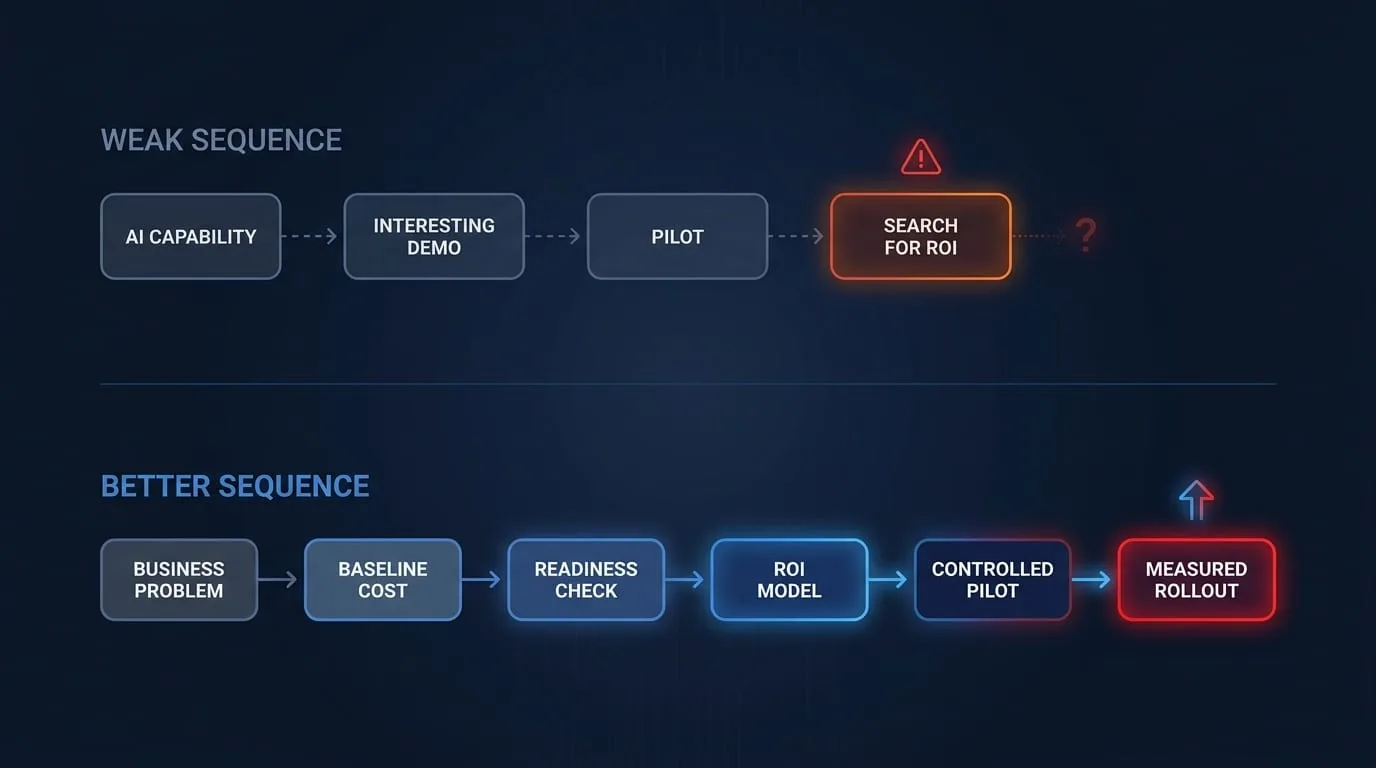
Workflow automation should not be treated as a collection of AI experiments. It should be treated as a portfolio of operational investments. Some use cases deserve immediate funding. Some need process cleanup first. Some should not be automated at all.
Start With the Workflow, Not the Tool
An AI automation use case is only as strong as the workflow underneath it.
Before evaluating models, vendors, or implementation patterns, describe the workflow in plain operational terms:
| Question | What You Need to Know |
|---|---|
| What triggers the workflow? | The event, request, document, message, or system change that starts the work |
| Who performs the work today? | Roles, teams, vendors, and systems involved |
| What decisions are made? | Approvals, classifications, prioritization, routing, exceptions |
| What data is used? | Documents, CRM records, ERP data, policies, tickets, emails, transcripts |
| What output is produced? | A decision, response, report, entry, recommendation, or completed task |
| What happens when it fails? | Rework, delays, customer impact, compliance risk, revenue leakage |
If the workflow cannot be described this clearly, it is not ready for AI automation. You may still have a valuable opportunity, but the first investment is process discovery, not implementation.
The Four Filters for High-ROI AI Automation
High-ROI use cases usually pass four filters:
- Value: The current workflow has a measurable cost, delay, error rate, or revenue constraint
- Readiness: The process, data, systems, and ownership structure are mature enough to support automation
- Risk control: The use case can be governed with appropriate human review, auditability, and fallback paths
- Adoption: The people affected by the workflow have a reason to use the new process
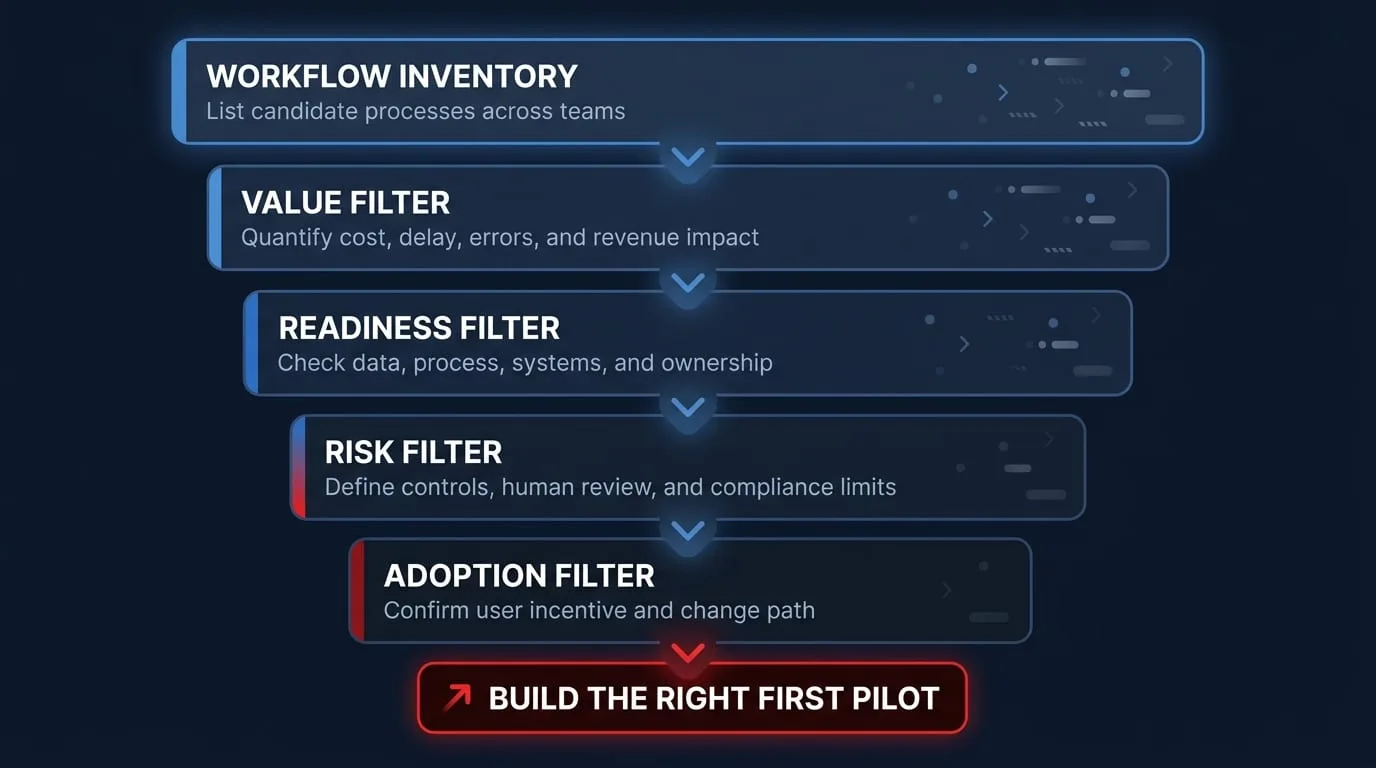
The highest-value idea is not always the best first project. A workflow with large theoretical savings but poor data quality, unclear ownership, or high compliance exposure may belong later in the roadmap.
Build a Workflow Inventory
Start by listing candidate workflows across the business. Do not limit the list to obvious back-office processes. AI workflow automation is often valuable where knowledge work, documents, decisions, and handoffs intersect.
| Function | Strong Candidate Workflows |
|---|---|
| Finance | Invoice intake, expense review, cash application, variance explanation |
| Sales | Lead research, account prioritization, proposal drafting, CRM hygiene |
| Customer support | Ticket triage, knowledge retrieval, response drafting, escalation routing |
| Operations | Exception handling, vendor onboarding, status reporting, work order routing |
| Legal | Contract intake, clause comparison, policy lookup, obligation extraction |
| HR | Candidate screening support, onboarding workflows, policy Q&A, training assignment |
| IT | Access requests, incident summaries, change documentation, service desk routing |
For each workflow, capture the same baseline data:
| Baseline Item | Example |
|---|---|
| Monthly volume | 2,400 invoices, 900 tickets, 180 contracts |
| Average handling time | 8 minutes per invoice, 22 minutes per ticket |
| Fully loaded labor cost | $55/hour analyst, $110/hour counsel |
| Error or rework rate | 4.5% of records require correction |
| Cycle time | 14 days from request to completion |
| Business impact | Delayed revenue, missed SLA, compliance exposure, customer churn |
This turns automation from a brainstorming exercise into an investment screen.
Separate Efficiency, Quality, and Revenue Value
AI automation value usually comes from three places. Keep them separate in the business case so finance and operations leaders can verify each assumption.
1. Efficiency Gains
Efficiency value comes from reducing manual effort or increasing throughput with the same team.
Use this formula:
Monthly Volume x Current Handling Time x Automation Rate x Fully Loaded Rate
= Monthly Efficiency Value
Example:
| Input | Value |
|---|---|
| Monthly volume | 1,500 requests |
| Current handling time | 12 minutes |
| Automation rate | 60% |
| Fully loaded rate | $62/hour |
| Monthly value | $11,160 |
Be careful with the word "savings." If you do not plan to reduce headcount or avoid a planned hire, the value is capacity reallocation, not cash savings. That can still be valuable, but it must be tied to a business outcome.
2. Quality Improvements
Quality value comes from reducing errors, missed steps, inconsistent decisions, or rework.
Use this formula:
Monthly Volume x Current Error Rate x Cost per Error x Expected Error Reduction
= Monthly Quality Value
Quality benefits are especially important in regulated or customer-facing workflows. A faster process that creates more exceptions is not automation. It is acceleration of failure.
3. Revenue Impact
Revenue value comes from improving conversion, retention, expansion, speed to quote, onboarding completion, or sales capacity.
Revenue claims need conservative modeling. Use a range, not a single estimate:
| Scenario | Assumption Pattern |
|---|---|
| Conservative | 25-40% of expected benefit realized, adoption slower than planned |
| Base case | 60-75% of expected benefit realized, rollout meets plan |
| Optimistic | 85-100% of expected benefit realized, adjacent use cases emerge |
The goal is not to make the projection look perfect. The goal is to make it credible enough to fund.
Score Readiness Before You Score Technology
An automation idea can have strong value and still be a poor first build. Use a readiness screen before selecting a model or designing the solution.
| Readiness Area | Question | Low Score Signal |
|---|---|---|
| Data | Is the required data available, accurate, and accessible? | Data lives in email, PDFs, or disconnected spreadsheets with no owner |
| Process | Is the workflow documented and reasonably consistent? | Every team member does the work differently |
| Systems | Can the automation integrate with existing tools? | No APIs, brittle exports, manual copy/paste between systems |
| Governance | Are the decision rights and controls clear? | No one owns approval rules, audit needs, or exception handling |
| Measurement | Can baseline and future-state metrics be tracked? | No reliable volume, cycle time, error, or outcome data |
| Adoption | Will users trust and use the automation? | The workflow changes incentives without explaining benefits |
Score each area from 1 to 5:
- 1: Not ready; foundational work required
- 2: Weak; address before pilot
- 3: Moderate; pilot only with narrow scope
- 4: Strong; ready for controlled implementation
- 5: Excellent; candidate for rapid scaling
Use cases with high value and readiness scores are strong first candidates. Use cases with high value and low readiness should enter a preparation track.
The Use Case Prioritization Matrix
After value and readiness scoring, place each candidate in a simple matrix.
| Category | Value | Readiness | Recommended Action |
|---|---|---|---|
| Quick Win | High | High | Build a focused pilot now |
| Strategic Bet | High | Medium | Prepare data, process, and governance before build |
| Foundation Work | High | Low | Modernize workflow first; do not automate yet |
| Incremental Improvement | Medium | High | Automate if implementation cost is low |
| Distraction | Low | Any | Deprioritize |
The best first AI automation project is usually a Quick Win: painful enough to matter, structured enough to automate, and contained enough to govern.
Strong and Weak Automation Candidates
Use this table to pressure-test the first set of ideas.
| Workflow | Candidate Strength | Why |
|---|---|---|
| Support ticket triage with clear categories and historical outcomes | Strong | High volume, measurable handling time, clear routing labels |
| Contract clause comparison against approved playbooks | Strong | Document-heavy, repeatable review patterns, human approval can remain |
| Invoice exception detection with ERP history | Strong | Structured inputs, measurable rework, clear financial impact |
| Executive strategy decisions | Weak | Low volume, ambiguous inputs, high judgment requirement |
| Sales email drafting with no CRM discipline | Weak | Potential value, but poor data and adoption foundation |
| Policy Q&A from outdated documents | Weak | RAG can retrieve content, but the source of truth is unreliable |
| Complex medical, legal, or financial decisions without review controls | Weak | Risk profile requires governance before automation |
Weak does not always mean bad. It often means "not first."
Define the Human-in-the-Loop Model
AI workflow automation does not require full autonomy to create value. In many enterprise workflows, the best design is assisted automation:
| Automation Level | Description | Best Fit |
|---|---|---|
| Assist | AI drafts, summarizes, extracts, or recommends; human decides | Legal, finance, support, sales |
| Route | AI classifies and sends work to the right queue | IT, support, operations |
| Execute with approval | AI prepares an action; human approves before completion | Finance, HR, procurement |
| Execute with exception review | AI completes routine work; humans review exceptions | High-volume standardized processes |
| Fully autonomous | AI completes work without human review | Low-risk, reversible, well-structured tasks |
Most organizations should start with assist, route, or execute-with-approval patterns. These designs reduce risk while still producing measurable efficiency and quality gains.
Model the True Cost
The business case should include more than software licensing. AI workflow automation costs usually fall into seven categories:
| Cost Category | What to Include |
|---|---|
| Discovery | Process mapping, baseline measurement, stakeholder interviews |
| Data preparation | Cleaning, labeling, permissions, source-of-truth work |
| Integration | APIs, identity, workflow tools, CRM/ERP/document systems |
| Model and platform | LLM usage, vector database, orchestration, monitoring |
| Governance | Policy review, audit logs, human review rules, risk controls |
| Change management | Training, communications, support, process updates |
| Operations | Maintenance, evaluation, prompt/model updates, exception review |
If the business case includes only the platform subscription, it is not a business case. It is a purchase request.
Build a Three-Scenario ROI Model
A CFO-ready automation case should not rely on one projection. Create three scenarios and probability-weight the result.
| Scenario | Probability | Cost Assumption | Benefit Assumption | Adoption Assumption |
|---|---|---|---|---|
| Conservative | 30% | Implementation cost 20% higher | 40% of projected Year 1 value | Slower adoption, more exceptions |
| Base Case | 50% | Cost meets estimate | 70% of projected Year 1 value | Adoption reaches target by month 9 |
| Optimistic | 20% | Cost meets or beats estimate | 90% of projected Year 1 value | Adjacent workflows added in Year 2 |
Then calculate:
- Payback period
- Net present value
- Internal rate of return
- Probability-weighted return
- Cost of delaying the project by 12 months
That last item matters. The strongest automation cases do not only show why the investment is attractive. They show why the status quo is expensive.
The 90-Day First Pilot Plan
Once a use case passes the value, readiness, risk, and adoption filters, keep the first implementation narrow. A good 90-day pilot proves the operating model, not just the technology.
| Phase | Timeline | Focus | Output |
|---|---|---|---|
| Discover | Weeks 1-2 | Map workflow, baseline cost, user needs, risk constraints | Use case charter and ROI baseline |
| Design | Weeks 3-4 | Define future workflow, human review, integration path, metrics | Pilot design and control plan |
| Build | Weeks 5-8 | Implement limited workflow automation | Working pilot in one team or queue |
| Measure | Weeks 9-10 | Compare baseline vs pilot performance | Efficiency, quality, and adoption report |
| Decide | Weeks 11-12 | Scale, iterate, pause, or retire | Roadmap and funding recommendation |
Do not declare success because the AI output looked good in a demo. Declare success when the pilot improves the workflow metrics that justified the build.
Metrics That Matter
Choose metrics before implementation begins.
| Metric Type | Examples |
|---|---|
| Efficiency | Average handling time, backlog reduction, throughput per FTE |
| Quality | Error rate, rework rate, escalation rate, audit exceptions |
| Speed | Cycle time, time to first response, approval latency |
| Adoption | Active users, assisted decisions accepted, override rate |
| Financial | Cost per transaction, avoided hire, revenue pulled forward |
| Risk | Policy violations, hallucination rate, human review findings |
The most useful metric is often the override rate: how often users reject, correct, or bypass the AI recommendation. A high override rate may reveal model quality issues, poor workflow design, unclear policy, or user distrust.
Common Mistakes
Mistake 1: Automating a Broken Process
If the current process is inconsistent, undocumented, or politically contested, AI will not fix it. It will make the inconsistency faster.
Better approach: Stabilize the workflow enough to define standard inputs, outputs, exception paths, and ownership.
Mistake 2: Chasing the Flashiest Use Case
The most visible use case may not be the best first project. High-risk, executive-facing workflows often create pressure before the operating model is ready.
Better approach: Start where the business value is measurable and the failure mode is controllable.
Mistake 3: Treating Human Review as Failure
Many leaders assume automation only counts if humans are removed from the workflow. That is often the wrong target.
Better approach: Use AI to remove low-value work from humans while keeping humans accountable for judgment, exceptions, and sensitive decisions.
Mistake 4: Measuring Activity Instead of Outcome
"The AI processed 10,000 records" is not a business result.
Better approach: Measure the impact on cycle time, cost per transaction, error rate, revenue, customer experience, or risk.
Mistake 5: Ignoring Change Management
Users do not adopt automation because it exists. They adopt it when it fits the way work actually gets done and makes their day better.
Better approach: Involve users early, explain the future workflow, train on exceptions, and measure adoption honestly.
A Practical First-Use-Case Checklist
Before you build, confirm these statements are true:
- We can describe the workflow trigger, inputs, decisions, outputs, and failure modes
- We know the monthly volume, handling time, labor cost, cycle time, and error rate
- We can calculate efficiency, quality, or revenue value using current-state data
- The required data is available, permissioned, and reliable enough for a pilot
- The workflow has an accountable business owner
- Human review and exception handling are designed before launch
- Success metrics are defined before implementation starts
- Users affected by the workflow understand what will change
- The first pilot can produce evidence within 90 days
If you cannot check these boxes, do not abandon the idea. Move it into a readiness track and fix the gaps first.
Key Takeaways
- Start with a measurable business problem: AI capability is not a business case
- Quantify the baseline: Current volume, time, cost, errors, and cycle time determine ROI
- Score readiness before technology: Data, process, systems, governance, measurement, and adoption determine whether the use case can work now
- Separate value types: Efficiency, quality, and revenue impact should be modeled independently
- Keep the first pilot narrow: Prove the workflow, controls, adoption, and measurement model before scaling
- Use human review intentionally: Assisted automation often creates the best risk-adjusted return
- Make the status quo visible: A strong case shows the cost of waiting, not just the value of acting
AI workflow automation can produce meaningful operational leverage, but only when the organization chooses the right starting point. The winners will not be the companies that automate the most workflows first. They will be the companies that identify the right workflows, prove the value, and scale with discipline.
Ready to identify your highest-ROI automation opportunities? Contact EGI Consulting for an AI workflow automation assessment and a 90-day roadmap for turning readiness into measurable business value.
Keep reading
All articles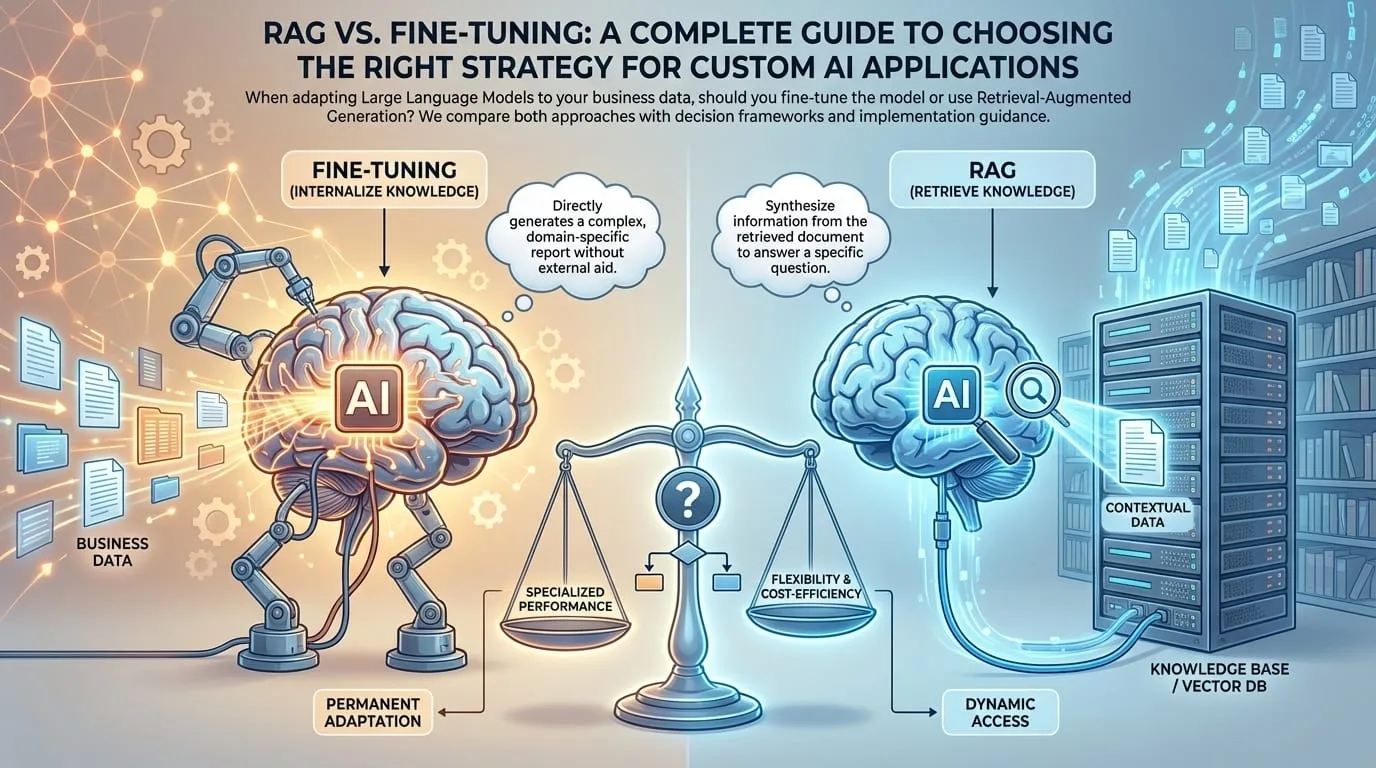
RAG vs. Fine-Tuning: A Complete Guide to Choosing the Right Strategy for Custom AI Applications
The Future of AI in Enterprise Software: Trends, Strategies, and Implementation Guide for 2024
MVP vs Prototype vs Proof of Concept: How to Choose the Right Validation Approach
Get new articles by email.
One or two a month. No marketing, no forwarding your address. Unsubscribe anytime.