DevSecOps: A Complete Guide to Shifting Security Left in Your CI/CD Pipeline
Security cannot be an afterthought in modern software development. Discover how to integrate security scanning, compliance checks, and vulnerability management directly into your development workflow.
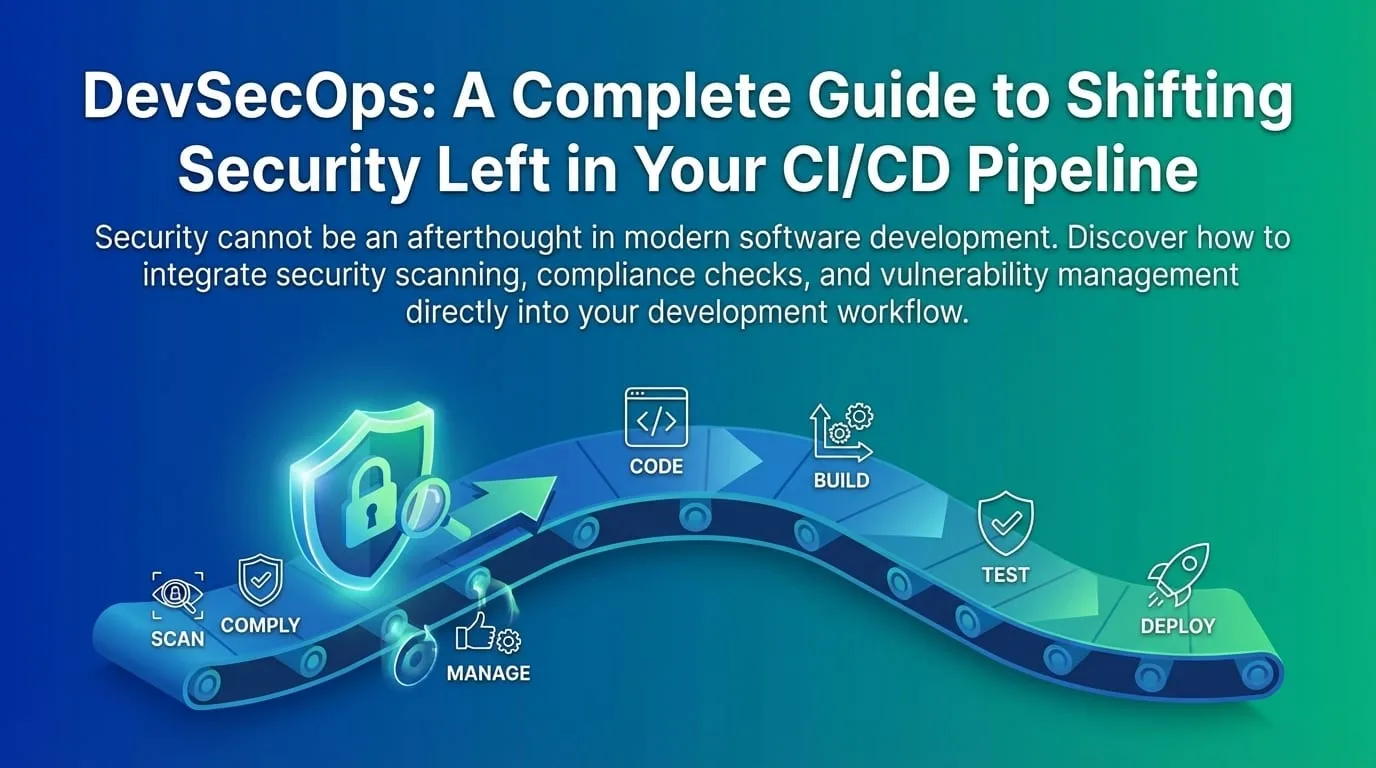
In the traditional "waterfall" model, security was a gatekeeper at the end of the development lifecycle. The security team would run a pentest on the "final" build, find critical issues, and send developers back to the drawing board weeks before launch.
In today's world of continuous deployment, this approach is obsolete. You cannot deploy five times a day if security checks take five days to complete. DevSecOps isn't just a buzzword-it's a fundamental shift in how we think about security in software development.
The Economics of Shift-Left Security
The earlier you find a security issue, the cheaper it is to fix:
| Stage Found | Relative Cost to Fix | Time to Fix |
|---|---|---|
| Design/Architecture | 1x | Hours |
| Development | 5x | Hours-Days |
| Integration/Testing | 10x | Days |
| Production | 30x | Days-Weeks |
| Post-Breach | 100x+ | Weeks-Months |
Source: IBM Systems Sciences Institute, NIST
This is why "shifting left"-moving security earlier in the development timeline-delivers such powerful ROI.
What is Shift-Left Security?
"Shifting left" means moving security responsibilities earlier in the development timeline-literally to the left on the project Gantt chart or CI/CD pipeline diagram.
Traditional Security (Waterfall)

Design ──► Build ──► Test ──► Release ──► [Security Gate] ──► Deploy
                                                   │
                                          "Critical vulns found!"
                                                   │
                                          ◄─── Rework ───┘

DevSecOps (Shift-Left)

Design ──► Build ──► Test ──► Release ──► Deploy
   │          │         │         │
   ▼          ▼         ▼         ▼
[Threat   [SAST]    [DAST]   [Runtime
 Model]   [SCA]     [Pen     Security]
          [Secrets   Test]
           Scan]
The DevSecOps Toolchain
A mature DevSecOps practice integrates multiple security controls throughout the pipeline:
1. Pre-Commit: Developer Workstation
Security starts before code even enters version control.
| Tool Type | Purpose | Examples |
|---|---|---|
| IDE Security Plugins | Real-time vulnerability hints | Snyk, SonarLint |
| Pre-commit Hooks | Block secrets, lint security patterns | pre-commit, Husky |
| Local SAST | Quick vulnerability scans | Semgrep, ESLint security rules |
Example: Pre-commit Configuration
# .pre-commit-config.yaml
repos:
  - repo: https://github.com/Yelp/detect-secrets
    rev: v1.4.0
    hooks:
      - id: detect-secrets
        args: ["--baseline", ".secrets.baseline"]

  - repo: https://github.com/returntocorp/semgrep
    rev: v1.45.0
    hooks:
      - id: semgrep
        args: ["--config", "p/security-audit", "--error"]

  - repo: https://github.com/zricethezav/gitleaks
    rev: v8.18.0
    hooks:
      - id: gitleaks
2. Static Application Security Testing (SAST)
What it does: Analyzes source code for vulnerabilities without running the application.
What it finds:
- SQL injection patterns
- Cross-site scripting (XSS) risks
- Insecure cryptographic implementations
- Hardcoded credentials
- Path traversal vulnerabilities
Integration Points:
- On every commit/pull request
- IDE plugins for immediate feedback
- CI pipeline as a quality gate
Example: GitHub Actions SAST Integration
# .github/workflows/security.yml
name: Security Scan

on:
  push:
    branches: [main, develop]
  pull_request:

jobs:
  sast:
    runs-on: ubuntu-latest
    steps:
      - uses: actions/checkout@v4

      - name: Run Semgrep
        uses: returntocorp/semgrep-action@v1
        with:
          config: >-
            p/security-audit p/secrets p/owasp-top-ten

      - name: SonarQube Scan
        uses: SonarSource/sonarqube-scan-action@v2
        env:
          SONAR_TOKEN: ${{ secrets.SONAR_TOKEN }}
          SONAR_HOST_URL: ${{ secrets.SONAR_HOST_URL }}

      - name: Quality Gate Check
        uses: SonarSource/sonarqube-quality-gate-action@v1
        timeout-minutes: 5
        env:
          SONAR_TOKEN: ${{ secrets.SONAR_TOKEN }}
Popular SAST Tools:
| Tool | Strengths | Languages |
|---|---|---|
| SonarQube | Comprehensive, great IDE integration | 25+ languages |
| Semgrep | Fast, customizable rules | 30+ languages |
| GitHub Advanced Security | Native GitHub integration | Major languages |
| Checkmarx | Enterprise features | 25+ languages |
| Veracode | Compliance focus | 25+ languages |
3. Software Composition Analysis (SCA)
What it does: Checks your dependencies for known CVEs (Common Vulnerabilities and Exposures).
Why it matters: Modern applications are 80-90% open-source code. You inherit their vulnerabilities.
Your Application (10% of code)
         │
         ▼
┌─────────────────────────────────────────┐
│           Dependencies (90%)             │
│  ┌─────────┐ ┌─────────┐ ┌─────────┐    │
│  │ React   │ │ Express │ │ Lodash  │    │
│  │ 18.2.0  │ │ 4.18.2  │ │ 4.17.21 │    │
│  └────┬────┘ └────┬────┘ └────┬────┘    │
│       │          │          │           │
│  (Their dependencies...)                 │
│  ┌─────┐ ┌─────┐ ┌─────┐ ┌─────┐       │
│  │ ... │ │ ... │ │ ... │ │ ... │       │
│  └─────┘ └─────┘ └─────┘ └─────┘       │
│                                         │
│  Any CVE here = Your vulnerability      │
└─────────────────────────────────────────┘
Integration Example:
# .github/workflows/sca.yml
name: Dependency Security

on:
  push:
  schedule:
    - cron: "0 0 * * *" # Daily scan

jobs:
  dependency-scan:
    runs-on: ubuntu-latest
    steps:
      - uses: actions/checkout@v4

      - name: Run Snyk
        uses: snyk/actions/node@master
        env:
          SNYK_TOKEN: ${{ secrets.SNYK_TOKEN }}
        with:
          args: --severity-threshold=high

      - name: OWASP Dependency Check
        uses: dependency-check/Dependency-Check_Action@main
        with:
          project: "my-app"
          path: "."
          format: "HTML"
          args: >-
            --failOnCVSS 7 --enableRetired
Popular SCA Tools:
| Tool | Key Features | Pricing |
|---|---|---|
| Snyk | Developer-friendly, auto-fix PRs | Free tier + paid |
| Dependabot | GitHub native, automated PRs | Free |
| OWASP Dependency-Check | Open source, comprehensive | Free |
| Mend (WhiteSource) | Enterprise features, license compliance | Paid |
4. Secrets Detection
Prevent credentials from entering version control:
# Gitleaks configuration
# .gitleaks.toml
title = "Gitleaks Configuration"

[allowlist] description = "Global allowlist" paths = [
'''(.*?)(test|spec)(.*?)''', '''.gitleaks.toml''' ]

[[rules]] id = "aws-access-key" description = "AWS Access Key" regex =
'''AKIA[0-9A-Z]{16}''' secretGroup = 0

[[rules]] id = "generic-api-key" description = "Generic API Key" regex =
'''(?i)api[_-]?key.*[=:]\s*['""]?([a-zA-Z0-9_-]{20,})['""]?''' secretGroup = 1
5. Container Security
If you're using containers, scan images for vulnerabilities:
# Container scanning in CI
- name: Build image
  run: docker build -t myapp:${{ github.sha }} .

- name: Run Trivy vulnerability scanner
  uses: aquasecurity/trivy-action@master
  with:
    image-ref: "myapp:${{ github.sha }}"
    format: "sarif"
    output: "trivy-results.sarif"
    severity: "CRITICAL,HIGH"

- name: Upload Trivy scan results
  uses: github/codeql-action/upload-sarif@v3
  with:
    sarif_file: "trivy-results.sarif"
6. Dynamic Application Security Testing (DAST)
What it does: Attacks the running application from the outside to find configuration errors or runtime issues.
When to use: In the staging environment before production deployment.
# DAST in staging
dast:
  runs-on: ubuntu-latest
  needs: [deploy-staging]
  steps:
    - name: OWASP ZAP Scan
      uses: zaproxy/action-full-scan@v0.8.0
      with:
        target: "https://staging.myapp.com"
        rules_file_name: ".zap/rules.tsv"
        cmd_options: "-a"
Popular DAST Tools:
| Tool | Type | Best For |
|---|---|---|
| OWASP ZAP | Open source | General web apps |
| Burp Suite | Commercial | Complex applications |
| Nuclei | Open source | Template-based scanning |
7. Infrastructure as Code (IaC) Security
Scan your Terraform, CloudFormation, and Kubernetes configs:
- name: Run Checkov
  uses: bridgecrewio/checkov-action@master
  with:
    directory: infrastructure/
    framework: terraform
    output_format: sarif
    soft_fail: false

- name: Run tfsec
  uses: aquasecurity/tfsec-action@v1.0.0
  with:
    working_directory: infrastructure/
    soft_fail: false
Common IaC Findings:
- S3 buckets without encryption
- Security groups with 0.0.0.0/0 access
- IAM policies with excessive permissions
- Kubernetes pods running as root
- Missing resource limits
The Complete DevSecOps Pipeline
Here's how all the pieces fit together:
┌─────────────────────────────────────────────────────────────────────┐
│                         DevSecOps Pipeline                          │
├─────────────────────────────────────────────────────────────────────┤
│                                                                      │
│  PRE-COMMIT          BUILD              TEST              DEPLOY    │
│  ──────────          ─────              ────              ──────    │
│                                                                      │
│  ┌──────────┐      ┌──────────┐      ┌──────────┐     ┌──────────┐ │
│  │ Secrets  │      │   SAST   │      │   DAST   │     │ Runtime  │ │
│  │ Detection│      │          │      │          │     │ Security │ │
│  └──────────┘      └──────────┘      └──────────┘     └──────────┘ │
│                                                                      │
│  ┌──────────┐      ┌──────────┐      ┌──────────┐     ┌──────────┐ │
│  │  Linting │      │   SCA    │      │ Pen Test │     │ Monitoring│ │
│  │ (Security│      │          │      │ (Manual) │     │ & Alerting│ │
│  │  Rules)  │      └──────────┘      └──────────┘     └──────────┘ │
│  └──────────┘                                                       │
│                    ┌──────────┐                       ┌──────────┐ │
│                    │ Container│                       │ Incident │ │
│                    │ Scanning │                       │ Response │ │
│                    └──────────┘                       └──────────┘ │
│                                                                      │
│                    ┌──────────┐                                     │
│                    │   IaC    │                                     │
│                    │ Scanning │                                     │
│                    └──────────┘                                     │
│                                                                      │
└─────────────────────────────────────────────────────────────────────┘
Cultural Challenges and Solutions
The biggest barrier to DevSecOps isn't tooling; it's culture. Here's how to address common challenges:
Challenge 1: "Security as Blocker"
Problem: Developers view security as something that slows them down.
Solutions:
- Make the easy path the secure path (secure defaults, templates)
- Provide immediate, actionable feedback (not just "vulnerability found")
- Measure security team on enablement, not just blocking
- Include security in sprint planning, not as a gate after
Challenge 2: "Not My Job"
Problem: Security responsibility is unclear between teams.
Solutions:
- Embed security champions in each development team
- Make security findings visible in developer tools (IDE, PRs)
- Include security in Definition of Done
- Train developers on secure coding practices
Challenge 3: "Alert Fatigue"
Problem: Too many low-priority findings overwhelm teams.
Solutions:
- Tune tools to reduce false positives
- Prioritize based on exploitability and business impact
- Use severity thresholds for pipeline gates
- Create clear escalation paths
The Security Champion Model
┌───────────────────────────────────────────────────────┐
│              Security Champion Model                   │
├───────────────────────────────────────────────────────┤
│                                                        │
│  ┌──────────────┐                                     │
│  │   Security   │ ◄── Expertise, strategy, oversight  │
│  │     Team     │                                     │
│  └───────┬──────┘                                     │
│          │                                            │
│          │ Training, support, tools                   │
│          ▼                                            │
│  ┌───────────────────────────────────────────┐       │
│  │        Security Champions (20%)            │       │
│  │  ┌─────┐  ┌─────┐  ┌─────┐  ┌─────┐       │       │
│  │  │Dev A│  │Dev B│  │Dev C│  │Dev D│       │       │
│  │  │(Champ)│ │(Champ)││(Champ)││(Champ)│    │       │
│  │  └──┬──┘  └──┬──┘  └──┬──┘  └──┬──┘       │       │
│  └─────┼────────┼───────┼────────┼───────────┘       │
│        │        │       │        │                    │
│        ▼        ▼       ▼        ▼                    │
│  ┌──────────┐ ┌──────────┐ ┌──────────┐ ┌──────────┐ │
│  │ Team 1   │ │ Team 2   │ │ Team 3   │ │ Team 4   │ │
│  │ (8 devs) │ │ (6 devs) │ │ (10 devs)│ │ (5 devs) │ │
│  └──────────┘ └──────────┘ └──────────┘ └──────────┘ │
│                                                        │
└───────────────────────────────────────────────────────┘
Metrics for DevSecOps Success
Track these metrics to measure your DevSecOps maturity:
| Metric | What It Measures | Target |
|---|---|---|
| Mean Time to Remediate (MTTR) | How quickly vulnerabilities are fixed | <7 days (critical) |
| Vulnerability Escape Rate | % of vulns that reach production | <5% |
| Security Scan Coverage | % of code/repos being scanned | 100% |
| False Positive Rate | % of findings that are invalid | <10% |
| Developer Security Training | % of developers trained | 100% |
| Security Debt Trend | Open vulnerabilities over time | Decreasing |
Implementation Roadmap
Phase 1: Foundation (Month 1-2)
- Implement secrets detection (pre-commit + CI)
- Enable Dependabot/Renovate for dependency updates
- Set up basic SAST scanning on PRs
- Create security findings triage process
Phase 2: Integration (Month 3-4)
- Add SCA to pipeline with severity thresholds
- Implement container scanning
- Add IaC security scanning
- Train development teams on secure coding
Phase 3: Maturation (Month 5-6)
- Implement DAST in staging environments
- Establish security champions program
- Create security dashboards and metrics
- Integrate security into sprint planning
Phase 4: Optimization (Ongoing)
- Tune tools to reduce false positives
- Automate remediation where possible
- Continuous training and improvement
- Regular threat modeling exercises
Key Takeaways
- Shift left is about economics: Finding bugs early is exponentially cheaper than finding them late
- Automate everything: Manual security gates don't scale with CI/CD
- Make secure easy: Developers will follow the path of least resistance
- Culture beats tools: The best scanners fail without buy-in
- Measure and improve: Track MTTR, escape rate, and coverage
- Start small, iterate: Don't try to implement everything at once
The payoff is worth it. By integrating security into the pipeline, you reduce the cost of remediation by orders of magnitude. Fixing a bug in design costs $1; fixing it in production can cost $10,000-or millions in data breach damages.
Ready to integrate security into your development pipeline? Contact EGI Consulting for a DevSecOps assessment and implementation roadmap tailored to your technology stack and team.
Keep reading
All articles
Zero Trust Architecture: The Complete Guide to Modern Enterprise Security
What to Automate, What to Skip: A Testing Strategy for Fast-Moving Teams
Observability Strategy for Modern Applications: Logs, Metrics, Traces, and Business Signals
Get new articles by email.
One or two a month. No marketing, no forwarding your address. Unsubscribe anytime.